How To & Tips
How to Replace the Motor Unit on Your Dolphin Liberty Robotic Pool Cleaner
26 August, 2026
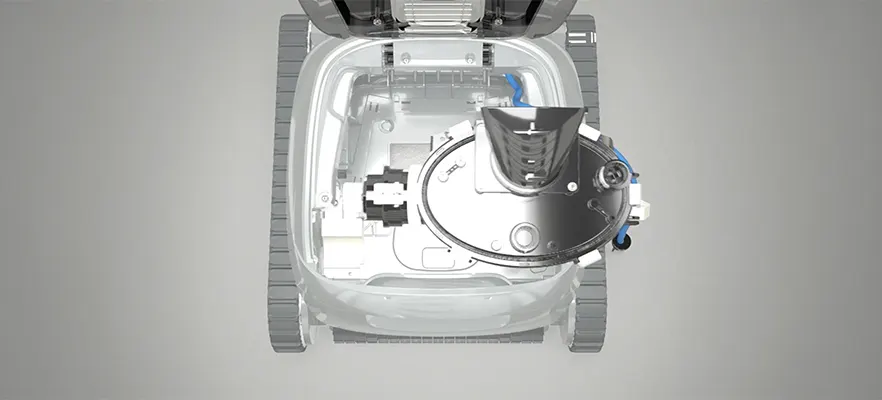
If your Dolphin Liberty robotic pool cleaner has stopped operating correctly or the motor unit requires replacement, you may be able to complete the repair yourself with the right tools and careful attention to detail. Replacing the motor unit can help restore your pool cleaner's performance, allowing it to continue delivering efficient cleaning across your pool floor, walls, and waterline.
Compared to Dolphin’s competitors, you can buy and replace parts if necessary.
This guide explains how to replace the motor unit on a Dolphin Liberty robotic pool cleaner using official Maytronics instructions and the accompanying video tutorial.
Why Genuine Maytronics Parts Matter
The Dolphin Liberty series is engineered with precision components designed to work together for optimal cleaning performance. Genuine replacement motor units are manufactured to meet Maytronics specifications, helping maintain:
Reliable cleaning performance
Efficient wall climbing
Proper suction and filtration
Long-term durability
Manufacturer compatibility
Using genuine parts also helps minimise the risk of premature wear or performance issues, ensuring your robotic pool cleaner continues to deliver the dependable results it's designed for.
When Should You Replace the Motor Unit?
The motor unit is the heart of your robotic pool cleaner. It powers the drive system, brushes, and filtration to keep your pool clean.
You may need to replace the motor unit if your pool vacuum experiences issues such as:
The robot no longer moves through the pool
The brushes stop rotating
The cleaner loses suction
The unit repeatedly displays motor-related faults
Internal motor damage has been diagnosed by troubleshooting or a service technician
Before replacing the motor unit, ensure you've ruled out simpler issues such as a blocked impeller, dirty filter basket, or discharged battery.
Tools You'll Need
Before starting, gather the following tools:
Phillips screwdriver
Flathead screwdriver
Maytronics Multi-Purpose Tool
Genuine replacement Dolphin Liberty motor unit
Using genuine Maytronics replacement parts helps ensure your robotic pool cleaner continues to perform as designed.
Step-by-Step: Replacing the Dolphin Liberty Motor Unit
The official Maytronics video demonstrates the replacement process in detail. Below is a simplified overview of the procedure.
1. Remove the Filter
Open the cleaner and remove the filter basket to access the internal components.
2. Remove the Outer Casing
Unscrew the outer casing cover and carefully lift off the top frame. Keep the screws in a safe place for reassembly.
3. Disconnect the Blue Power Wire
Release the blue wire from the hooks on the side of the motor unit. Using the Maytronics Multi-Purpose Tool, unscrew the power plug and firmly disconnect the wire from the motor.
4. Remove the Float
Lift out the internal float to gain clear access to the motor assembly. Handle the float carefully to avoid damage.
5. Remove the Existing Motor Unit
Undo the two screws securing the motor unit. Lift the motor assembly out of the chassis.
6. Install the New Motor Unit
Position the replacement motor so that the locating protrusion fits correctly into the chassis. Secure it using the original mounting screws.
7. Reassemble the Cleaner
Complete the reassembly by:
Reinstalling the float
Reconnecting and tightening the blue power wire
Securing the wire back into its retaining hooks
Reattaching the outer casing and tightening the screws
Once complete, your pool cleaner is ready for testing.
Watch the Official Video Tutorial
The official Maytronics video walks you through every step of the replacement process, making it much easier to follow along while performing the repair.
Watching the video before beginning can help you understand the order of disassembly, identify each component correctly, and ensure everything is reinstalled securely. Following the visual guide alongside the written instructions can make replacing the motor unit quicker and more straightforward.
Tips for a Successful Repair
To protect your robotic pool cleaner during the repair:
Work on a clean, flat surface.
Keep screws and small components organised.
Avoid forcing connectors or plastic clips.
Check that all seals are correctly positioned before reassembly.
Confirm every electrical connection is secure before operating the cleaner.
Taking your time helps ensure the replacement is completed safely and correctly.
Keep Your Pool Cleaner Performing at Its Best
Replacing the motor unit is just one part of maintaining your Dolphin Liberty. Regular care can significantly extend the life of your robotic pool cleaner and help it clean more efficiently every time it enters the pool.
To keep your pool vacuum operating at peak performance:
Clean the filter basket after every cleaning cycle.
Inspect the brushes and tracks for wear.
Remove debris from the impeller when necessary.
Store the cleaner in a shaded, dry location when not in use.
Follow the manufacturer's recommended maintenance schedule.
Routine maintenance helps prevent unexpected breakdowns and ensures your Dolphin Liberty continues to provide consistent, energy-efficient cleaning season after season.
Frequently Asked Questions
Can I replace the Dolphin Liberty motor unit myself?
Yes. If you're comfortable using basic hand tools and carefully following the official Maytronics instructions, replacing the motor unit is a straightforward process. Watching the official video tutorial before you begin is highly recommended.
How long does it take to replace the motor unit?
For most users, the replacement takes approximately 20 to 40 minutes, depending on experience and familiarity with the cleaner.
Should I use genuine replacement parts?
Yes. Genuine Maytronics parts are designed specifically for Dolphin Liberty robotic pool cleaners and help ensure optimal performance, reliability, and compatibility.
What should I do if my robotic pool cleaner still isn't working?
If replacing the motor unit doesn't resolve the issue, inspect the filter basket, impeller, battery, and electrical connections. If problems persist, contact your authorised Maytronics dealer or service centre for professional assistance.
Get Your Dolphin Liberty Back to Peak Performance
A properly functioning motor unit is essential for keeping your Dolphin Liberty robotic pool cleaner cleaning efficiently and reliably. By following the official replacement procedure and using genuine Maytronics parts, you can restore your pool vacuum's performance and enjoy crystal-clear water with minimal effort.
Whether you're carrying out routine maintenance or replacing worn components, taking care of your robotic pool cleaner helps maximise its lifespan and keeps it performing at its best.
Keep Your Dolphin Running Like New
Need genuine replacement parts or expert support for your Dolphin Liberty robotic pool cleaner?
Visit the Maytronics Australia website to find authorised dealers, access helpful maintenance resources, and watch official how-to videos.
With the right parts and expert guidance, you can keep your pool cleaner operating at peak performance and enjoy a cleaner, healthier pool all year round.
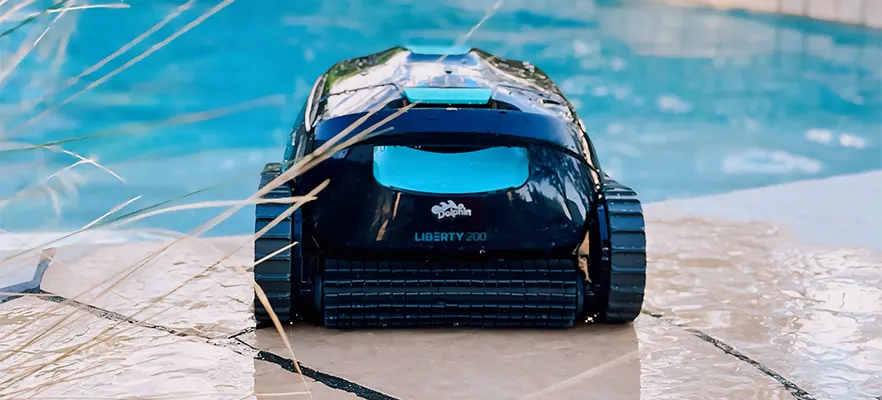
Pool Cleaner
pool vacuum
commercial pool cleaner
robotic pool cleaner