How To & Tips
How to Clean Your Dolphin EON™ 120d Cordless Pool Cleaner DebrisLock™ Filter
13 September, 2026
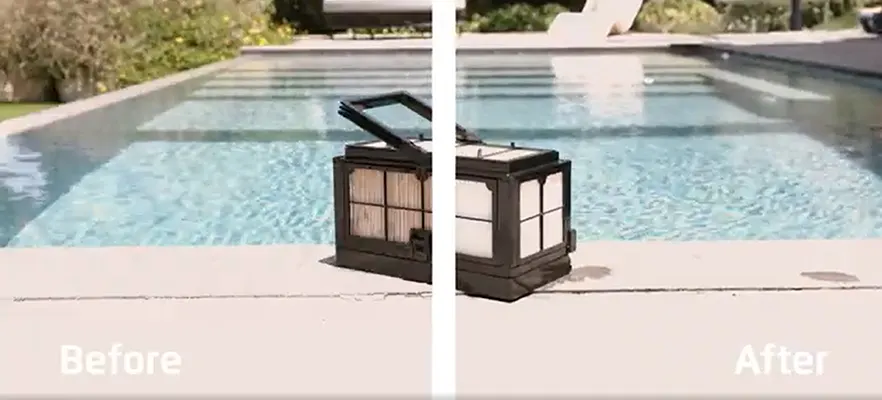
Keeping your robotic pool cleaner's filter clean is an important part of maintaining effective pool cleaning performance. The Dolphin EON™ 120d makes this easier with its patented DebrisLock™ filtration system, designed to capture ultra-fine debris while reducing the need for frequent manual filter cleaning.
Whether you're new to the Dolphin EON™ 120d or want to get the most from your pool cleaner, understanding how to check, rinse and maintain its filter can help keep your robotic pool cleaner ready for its next cleaning cycle.
What Is the Dolphin EON™ 120d Pool Vacuum DebrisLock™ Filter?
The Dolphin EON™ 120d uses DebrisLock™ backwash filtration to collect dirt, leaves and ultra-fine particles from your swimming pool.
Unlike a standard filter system, DebrisLock™ is designed to help manage the debris collected during cleaning and reduce the frequency of manual filter maintenance.
Maytronics states that the system can provide up to 4x clearer water and save up to 20 hours of maintenance per year.
For pool owners, this means less time spent maintaining the pool cleaner and more time enjoying the pool.
Does the Dolphin EON™ 120d Cordless Pool Cleaner Filter Need to Be Cleaned?
Yes. While DebrisLock™ is designed to reduce how often the filter needs manual cleaning, it still needs to be checked and rinsed when required.
After removing the Dolphin EON™ 120d cordless pool cleaner from the pool, it is recommended to rinse the filter to remove collected debris. Cleaning the filter promptly can also help prevent dirt and debris from drying and becoming harder to remove.
The DebrisLock™ filter has two chambers, so both should be rinsed during the cleaning process.
How to Clean the Dolphin EON™ 120d Swimming Pool Cleaner Filter
Cleaning the Dolphin EON™ 120d filter is a simple part of regular pool maintenance.
1. Remove the Dolphin EON™ 120d from the pool
Take the robotic pool cleaner out of the water after its cleaning cycle.
2. Open the filter compartment
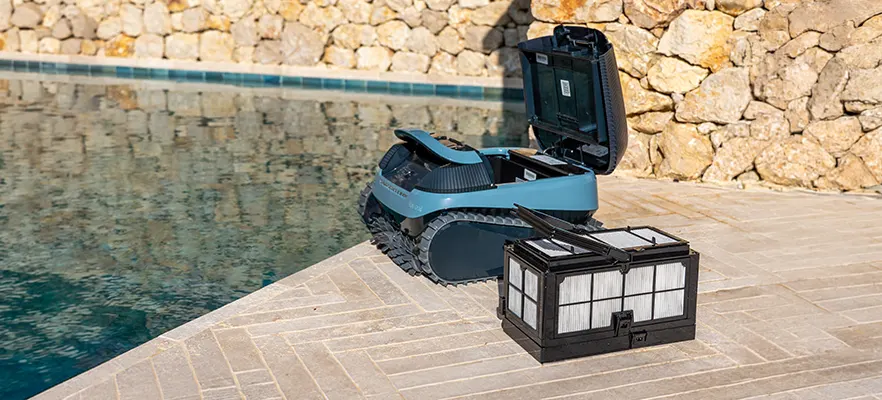
Access the filter compartment and remove the DebrisLock™ filter.
3. Rinse the filter
Use clean water to thoroughly rinse both chambers of the filter. Focus on removing leaves, dirt and fine debris collected during the cleaning cycle.
4. Check for remaining debris
Inspect the filter to make sure any remaining debris has been removed.
5. Reinstall the filter Once clean, place the DebrisLock™ filter back into the Dolphin EON™ 120d so it is ready for its next cleaning cycle. For a visual guide to the filter-cleaning process, watch the video below:
Watch: Dolphin EON™ 120d Filter Cleaning
How Often Should You Clean the Dolphin EON™ 120d Filter?
The DebrisLock™ system is designed to reduce the need for frequent manual filter cleaning, but there is no one cleaning schedule that suits every pool. How often you need to rinse the filter can depend on factors such as:
How frequently you use your pool cleaner
The amount of leaves and larger debris in the pool
The amount of fine dirt and particles in the water
Seasonal conditions
How often the pool is cleaned
Checking the filter regularly is the best way to determine when it needs attention. The Maytronics One™ app can also help you monitor the filter level when the Dolphin EON™ 120d is out of the water.
Why Regular Filter Cleaning Matters
Even with advanced filtration, regular filter care remains an important part of looking after any robotic pool cleaner. A clean filter allows the Dolphin EON™ 120d to continue collecting debris during its cleaning cycles. Regular rinsing also helps prevent accumulated dirt from drying on the filter. The benefit of DebrisLock™ is that it is designed to reduce how often this manual maintenance is required, helping make pool care more convenient.
More Than Just a Pool Vacuum
While filter maintenance is a key part of the Dolphin EON™ 120d experience, the robotic pool cleaner is designed to provide comprehensive cleaning across your swimming pool. The Dolphin EON™ 120d can clean:
Pool floors
Walls
Waterlines
Steps
Tanning ledges as shallow as 20 cm
SmartMap™ Navigation helps the robot navigate the pool, while JetIQ™ technology helps it maintain grip when cleaning steps and challenging surfaces. Its cordless design also eliminates the need to manage a power cable while cleaning.
Make Pool Maintenance Easier with the Dolphin EON™ 120d Pool Cleaner
The Dolphin EON™ 120d is designed to make automated pool cleaning more convenient, and its DebrisLock™ filtration system is an important part of that experience.
Although the filter still needs to be checked and rinsed when required, its backwash filtration technology is designed to reduce the frequency of manual filter cleaning while capturing ultra-fine debris.
With straightforward filter maintenance, intelligent navigation and comprehensive pool coverage, the Dolphin EON™ 120d can help you spend less time looking after your swimming pool cleaner and more time enjoying your pool.
Frequently Asked Questions
How do I clean the Dolphin EON™ 120d filter?
Remove the DebrisLock™ filter from the Dolphin EON™ 120d and thoroughly rinse both filter chambers with clean water. Remove any remaining debris before reinstalling the filter.
Does the Dolphin EON™ 120d have a self-cleaning filter?
The Dolphin EON™ 120d uses patented DebrisLock™ backwash filtration, which is designed to reduce the need for frequent manual filter cleaning. The filter should still be checked and rinsed when required.
How often should I clean the Dolphin EON™ 120d filter?
DebrisLock™ is designed to reduce the frequency of manual filter cleaning. Check the filter regularly and rinse it when debris has accumulated.
Can I check the Dolphin EON™ 120d filter status?
Yes. The Maytronics One™ app allows you to check the filter level when the Dolphin EON™ 120d is out of the water.
What does the Dolphin EON™ 120d filter collect?
The DebrisLock™ filtration system is designed to capture leaves, dirt and ultra-fine particles collected from your swimming pool.
Does the Dolphin EON™ 120d clean walls and steps?
Yes. The Dolphin EON™ 120d is designed to clean the floor, walls, waterline, steps and tanning ledges as shallow as 20 cm.
Keep Your EON™ 120d Performing at Its Best
Regularly rinsing the DebrisLock™ filter helps keep your Dolphin EON™ 120d pool cleaner working efficiently and maintaining strong cleaning performance.
Want to learn more about the Dolphin EON™ 120d? Visit your nearest Elite Dealer for expert advice, or explore the EON™ 120d on the Maytronics Australia website.
Pool Cleaner
pool vacuum
commercial pool cleaner
robotic pool cleaner